Certificate and survey management for ship managers

Ship certificates, surveys and class conditions in one register

Every certificate, survey, condition of class and PSC finding across your fleet, with what falls due next and what each ship is still missing. Built for technical managers, superintendents and DPAs.

Free during the pilot. No card, no contract, and every register exports to CSV.

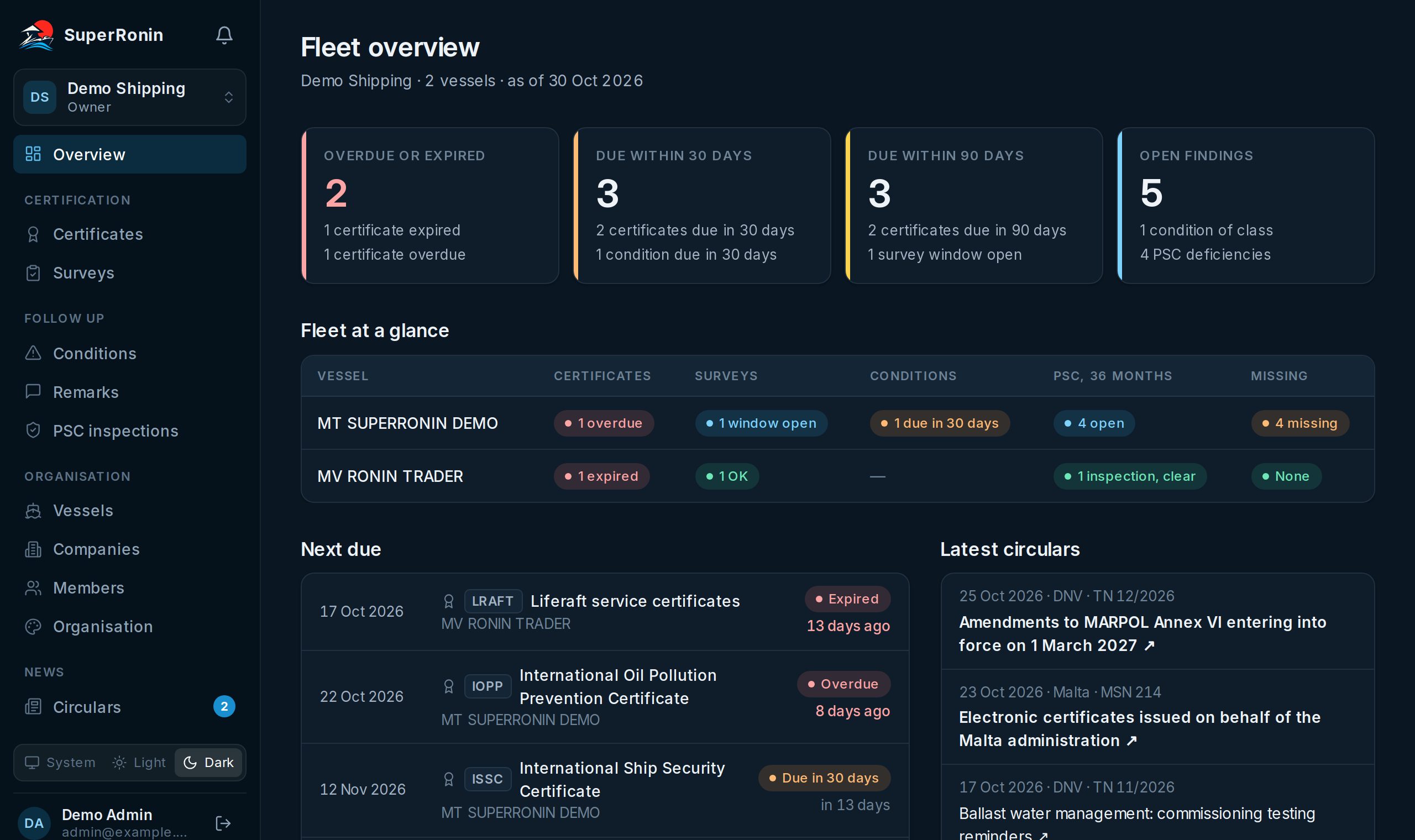
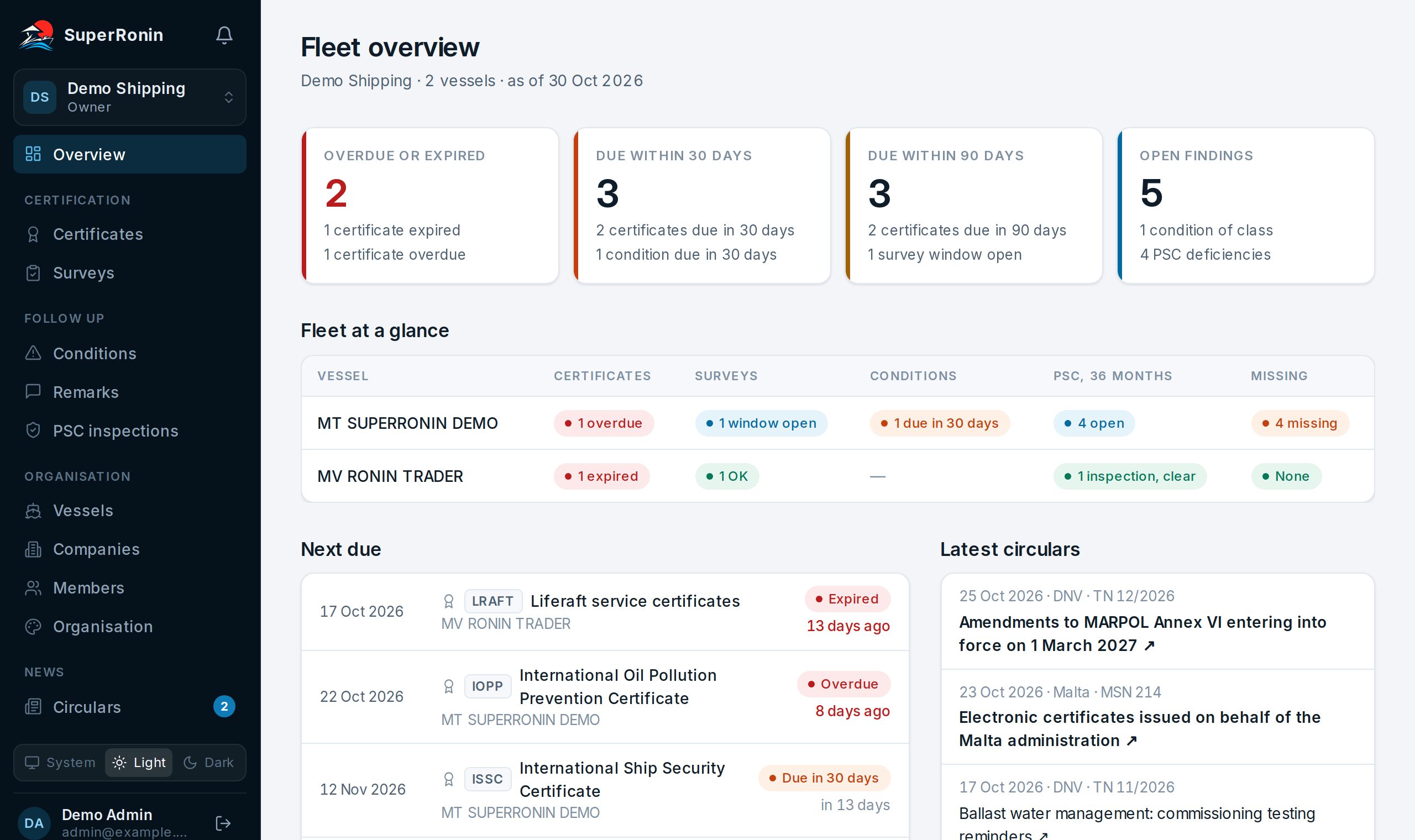
Fleet overview with counts of overdue and upcoming items and a vessel by register status matrix
106certificate and document types, each with the rules for which ships need it
11flag, class, P&I and PSC issuers whose circulars we read
587PSC deficiency codes, suggested on every inspection
6reminder steps per due date: 90, 60, 30, 14, 7 days before and the day it passes

Fleet overview

The whole fleet on one screen

The first page after sign-in answers the question a technical director asks first: is anything about to go wrong?

  • Overdue, due in 30 days, due in 90 days and open findings, each line linked to the filtered register
  • One row per vessel with the worst status in every register, PSC record and missing papers
  • The ten nearest due dates across certificates, surveys and conditions
How the overview works →
Fleet overview in the light theme with counts of overdue and upcoming items and a vessel by register status matrix

Registers

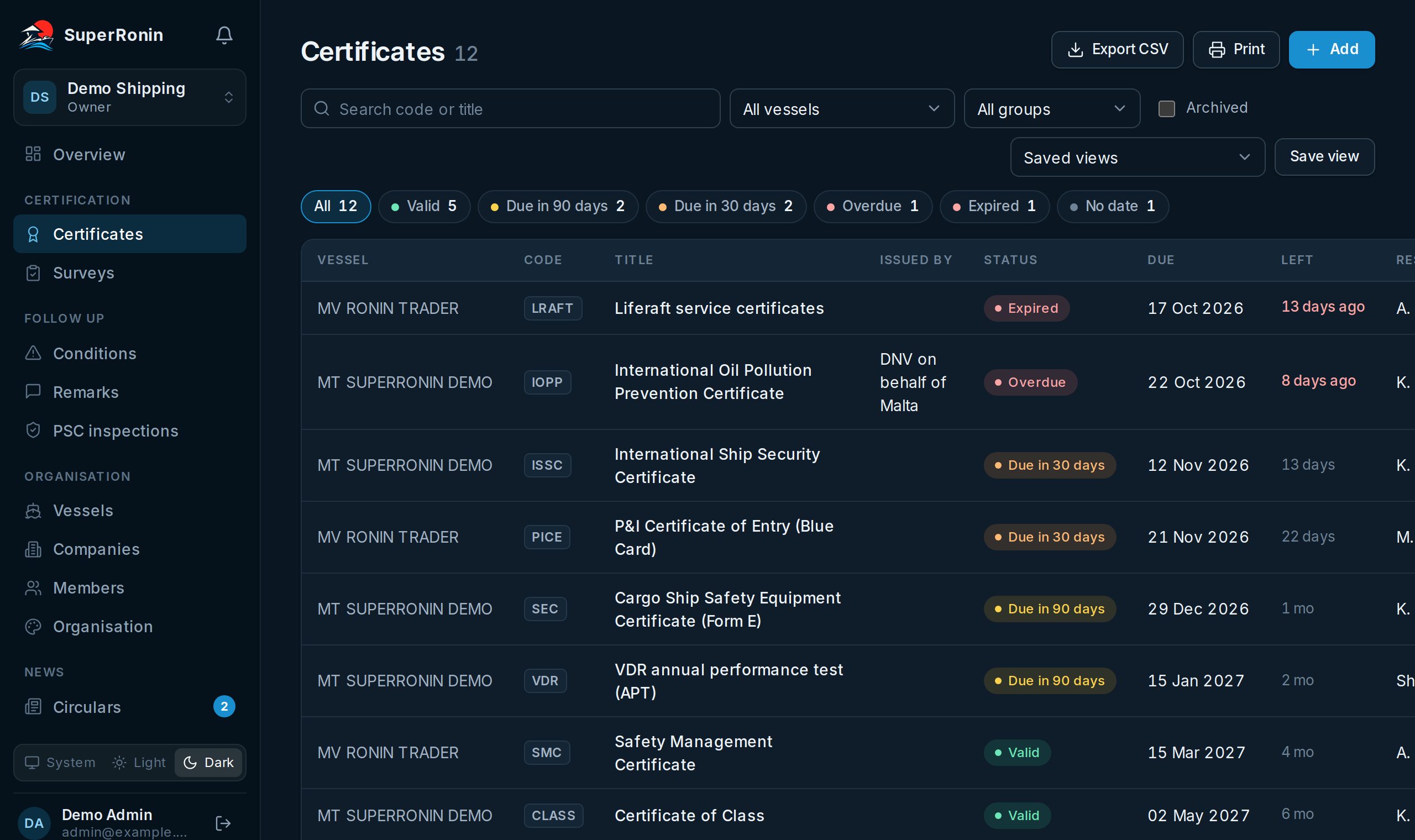
Certificates, surveys and conditions, sorted by what falls due first

Issue and expiry dates, extensions, last and next endorsement, survey windows and postponements. The status comes from the earliest of those dates, so a slipping annual endorsement shows up before the expiry does.

  • Reminders 90, 60, 30, 14, 7 days before a due date and once more when it passes, only to the people assigned to that ship
  • Saved views per person or for the whole office, CSV export and one printed sheet per vessel
  • PSC inspections with Form B deficiencies; one click turns a deficiency into a condition with its due date
All PSC deficiency codes →
Certificates register with status filters, due dates and days left for two ships

Vessel card

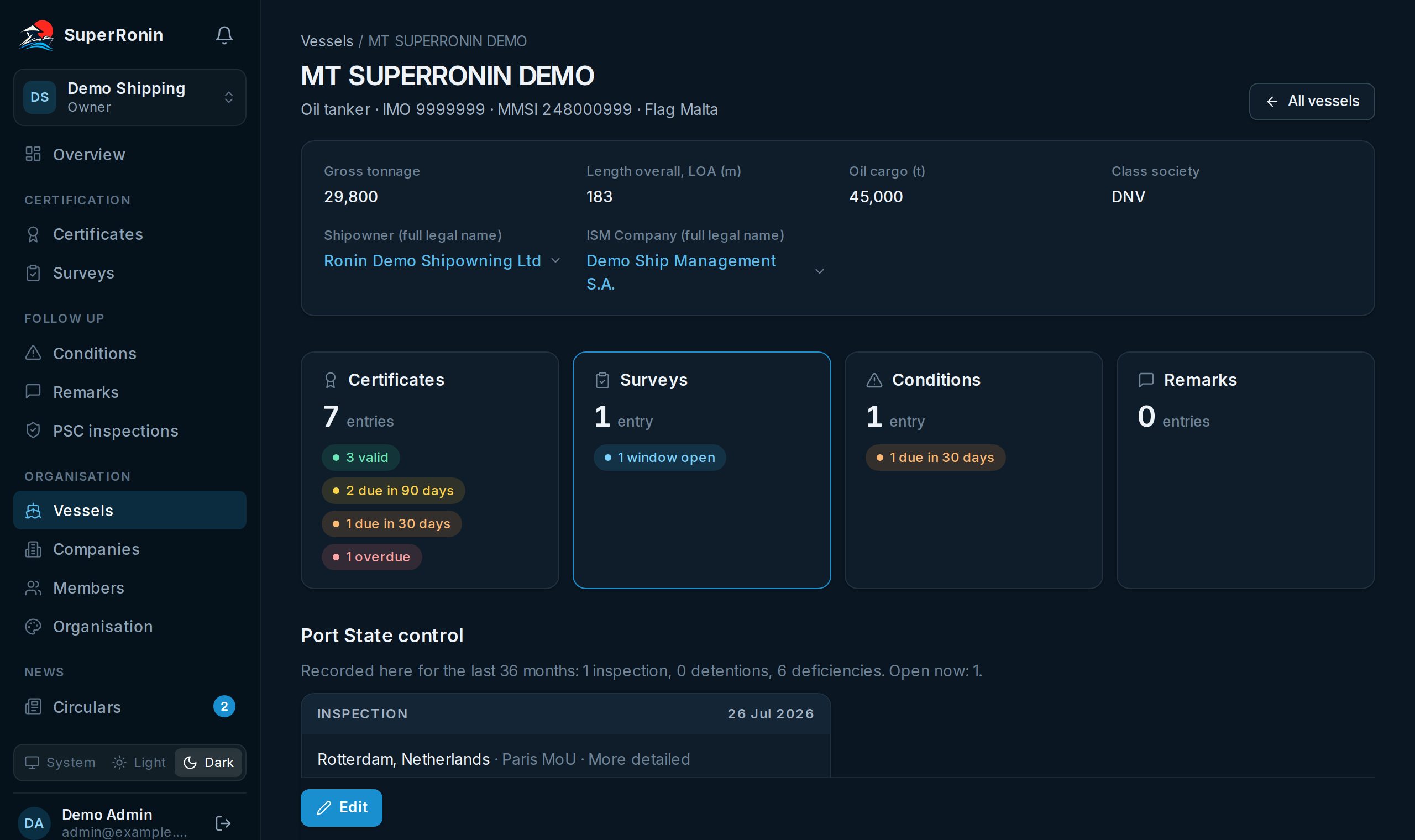
Each ship knows which papers it is missing

The catalogue starts with 106 certificate and document types. Each type knows which ships need it, by ship kind, tonnage, length, passengers, oil cargo and trade profile.

  • Mandatory papers with no live certificate on file, grouped by statutory, flag, class and insurance
  • Open items per register and the PSC history of the last 36 months
  • Circulars of the ship's flag administration, class society and P&I club
Flag, class and P&I issuers we read →
Vessel card with particulars, open items per register and the list of what's missing

Audit trail

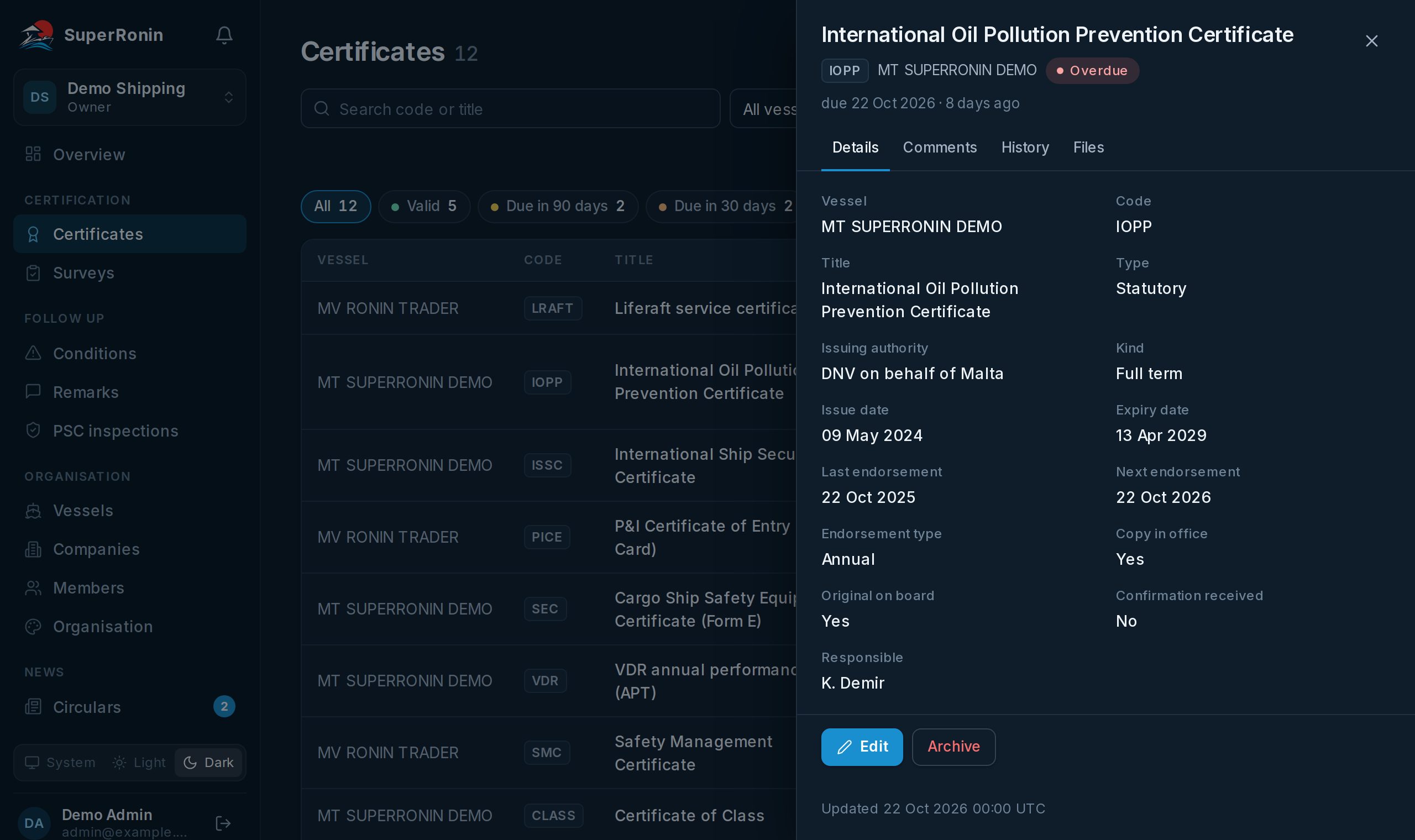
Dates, scans, comments and a full history on every entry

Attach PDFs and photos up to 50 MB to any entry. Every change is logged with who made it, when, and the old and new value.

  • Scans open through signed links that stop working within two hours
  • Deleting archives an entry; it can be restored with its history
  • Comments sit on the entry itself, so the office and the ship discuss the same certificate
Where the data is kept →
A certificate opened in the side panel with its status, dates and tabs for comments, history and files

Everything in it

Certificates

Issue and expiry dates, extensions, last and next endorsement, and where the original is kept. The status comes from the earliest of those dates, so an annual endorsement that slips shows up before the expiry does.

Surveys

Interval, last done, next due and the window around it. Postponements keep their new date and the reason.

Conditions of class and remarks

Who issued them, the due date, and how and when they were closed. Open conditions count towards reminders like certificates do.

PSC inspections

Each port State control inspection with its deficiencies from Form B: code, action taken, detainable, RO responsible, closed. One click turns a deficiency into a condition with the due date its action code gives. The vessel card shows the history with detentions marked.

Missed documentation

The catalogue starts with 106 certificate and document types. Each one knows which ships it applies to: by ship kind, gross tonnage, length, passengers, oil cargo and profile (noxious liquids, dangerous goods, INF cargo, polar waters, gas fuel). The vessel card lists the mandatory ones with no live certificate on file.

Reminders

One email digest per step, 90, 60, 30, 14, 7 days before a due date and once more when it passes. Grouped by vessel and sent only for the ships a person is assigned to. The same steps ring the bell in the app.

Circulars

Pick the flag administration, class society and P&I club on the vessel card, and new circulars from their public lists arrive as a one-line bulletin with a link to the original, in the bell and under News. Port State control regimes and the IMO are listed for every ship, and a refusal of access that names your vessel rings the bell. We add more issuers on request.

Scans, comments and history

Attach PDFs and photos up to 50 MB to any entry. Every change is logged with who made it and when, and scans open through links that stop working within two hours.

Circulars of your flag, class and P&I club, without visiting their sites

Set the flag administration, class society and P&I club on a vessel card. SuperRonin reads their public lists and sends each new document as one line with a link to the original, in the bell and by e-mail, to the people assigned to that ship.

Your issuers only

A ship on the Zanzibar register gets ZMA circulars, a Panama ship gets Merchant Marine Circulars. Lists of the issuers you follow are read every 3 hours.

Port State control by IMO number

A Paris or Tokyo MoU notice that names one of your ships by IMO number rings the bell, even if you follow nothing else.

An open index

Every document we find is also listed on a public page per issuer, with RSS and JSON feeds. No sign-in needed to browse it.

How it works

  1. 1

    Create your organisation

    Sign in with your work email or Google and give the company a name.

  2. 2

    Add your ships

    Search by name, IMO or MMSI. Ships the Skydex AIS network has heard come with their identifiers filled in.

  3. 3

    Invite the office and the ship

    Managers edit, purchasers and viewers read, and the account on board sees its own vessel only.

Roles and permissions

These are the defaults. An admin can switch each action on or off per role: commenting, scans, editing, changing dates, adding and archiving entries, vessels and export.

OwnerAdminManagerPurchaserViewerVessel
See the registers✓✓✓✓✓✓
Comment✓✓✓––✓
Upload and remove scans✓✓✓––✓
Edit entries (except dates)✓✓✓––✓
Change dates✓✓✓–––
Add entries (with their dates)✓✓✓––✓
Archive and restore entries✓✓✓––✓
Add and edit vessels✓✓✓–––
Export CSV and print✓✓✓✓✓✓
Manage members and permissions✓✓––––
Owner
Created the organisation. Everything, including members.
Admin
Everything, including members, the certificate catalogue and what each role below may do.
Manager
Edits registers and vessels.
Purchaser
Reads every register.
Viewer
Reads every register.
Vessel
The account on board: one ship, uploads scans, ticks "original on board", cannot change dates.

Security and your data

Private storage

Scans and documents sit in private storage with no public address. A file opens only through a signed link made for a signed-in member, and the link expires within two hours.

Access by role and by ship

Each organisation sees only its own data. People can be limited to particular ships, and an admin decides per role who may edit, change dates, archive or export.

Full change history

Every change keeps who made it, when, and the old and new value. Deleting an entry archives it; nothing disappears without a trace.

Backups

The database is backed up every day and backups are kept for 14 days. Where the service is hosted and who processes what is on the privacy page.

Your data stays yours

Export any register to CSV or print it at any time. When a company stops using the service, we delete its data on request.

Questions from IT or legal

Send your security questions or questionnaire to [email protected] and we answer them in writing.

Hosting, processors, retention and your rights under the GDPR: see the privacy page.

See it with your own fleet

We are running SuperRonin with the first shipping companies now. Book a call and we go through it with your ships and papers, click through the live demo with a made-up fleet, or start the free pilot yourself: no card, no contract.

Or write to [email protected]

Questions

What certificates must a ship carry?

It depends on the flag, the ship type, its size and its trade. IMO FAL.2/Circ.133 lists the certificates and documents required on board. Our starting catalogue of 106 types is built from that list plus the usual class, flag, insurance and equipment papers, and each type carries the thresholds that decide whether it applies. Your flag or class may ask for more, and you can add your own types.

How do I track ship certificate expiry dates?

Enter each certificate with its issue and expiry dates, extensions and endorsements. The register sorts by the nearest due date and marks every entry as valid, due in 90 days, due in 30 days, overdue or expired. Everyone assigned to the ship gets an email digest 90, 60, 30, 14, 7 days before a due date and again when it passes.

What is the difference between expiry, extension and endorsement here?

Expiry is the date printed on the certificate. An extension replaces it until the new date. An endorsement is the periodic sign-off, such as an annual or intermediate survey, and the next one can fall due long before the expiry. The due date we show is the earliest of the extended or original expiry and the next endorsement.

Can the crew use it on board?

Yes. The vessel role is an account for the ship itself. It sees only its own vessel, can upload scans and mark that the original is on board, and cannot change dates. Dates are changed from the office.

Where do the circulars come from?

From the public circular lists and feeds of the flag administrations, class societies and P&I clubs your vessels use, and of the Paris, Tokyo and Abuja MoUs and the IMO, checked every 3 hours. We copy the number, the date and the title as the issuer publishes them and link the original document; we do not keep copies or write summaries. If your flag, class or club is not on the list yet, tell us which one.

Can I import our existing spreadsheet?

Not yet. Entries are added through the form today, and every register exports to CSV. Import from a spreadsheet is the next thing we are building.

Who can see our documents?

Only members of your organisation, and only for the ships they are assigned to. Scans are kept in private storage and open through short-lived signed links. The privacy page explains where the data is hosted and who processes it.

How much does it cost?

Nothing while we run the pilot with the first companies. There is no card to enter and no contract to sign to start.